Things to Note
- Submit a new, coloured photograph for your application.
- For hardcopy submission, print your photograph on a matte or semi-matte (non-reflective) finish.
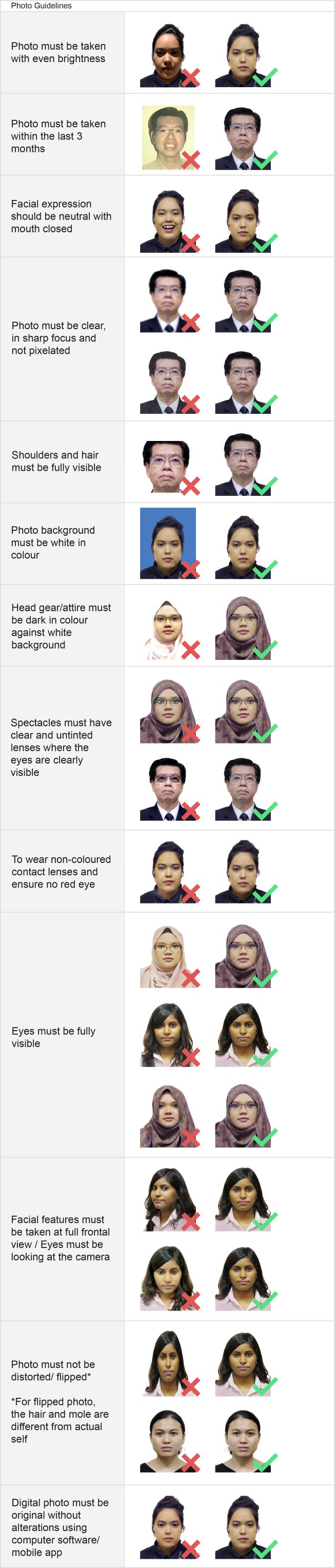
- Ensure your photograph meets ICA’s photo requirements, which follows International Standards Organisation and International Civil Aviation Organisation specifications.
- Read the “Dos and Don’ts” below to ensure your photograph meets these requirements for a smooth application process.
| Questions | Answers |
|---|---|
| Can I use a photograph taken with my mobile phone for passport or identity card applications requiring a photo ID? | We recommend downloading mobile apps specifically designed for passport or identity card photographs to help you take photographs in the required dimensions. You can also use the image editing software on your computer to resize your digital photograph. However, do not alter or enhance the photograph in any other way. This includes modifying your facial features and/ or using photo filters. |
Can I use a selfie taken with my mobile phone for passport or identity card applications requiring a photo ID? | For the best results, we recommend asking someone to take your photograph. Selfies taken with a mobile phone usually do not meet our photo requirements and could delay your application. Please read our photo guidelines before taking your photograph. |
What are the recommended dimensions for online photo submissions? | Your photograph must be 400 x 514 pixels when you upload it via our e-Services. |
Additional Requirements
Online photo submissions must meet the following specifications:
| Accepted file formats | Maximum file size |
|---|---|
| JPG, JPEG, HEIC, HEIF, and PNG | 8 MB |
Dos and Don'ts